






 |
|||||||||||||||||||||||||
| DVFilm Maker for Mac | |||||||||||||||||||||||||
 |
|||||||||||||||||||||||||
|
The low cost way to make DV look like film.
|
|||||||||||||||||||||||||
|
ONLY $95 ORDER HERE
New Version 2.4.4 for Windows or 2.16 for Mac |
|||||||||||||||||||||||||
|
*
|
|||||||||||||||||||||||||
 |
|||||||||||||||||||||||||
| Chat LIVE with DVFilm about Maker | |||||||||||||||||||||||||
DVFilm Maker is your 24P Conversion House!
|
|||||||||||||||||||||||||
 |
|||||||||||||||||||||||||
 |
|||||||||||||||||||||||||
 |
 |
||||||||||||||||||||||||
|
Everyone's heard of the new 24P miniDV video cameras that achieve a real film-like appearance by sampling 24 video "frames" per second and then recording that to NTSC. But now you can achieve that look with any video camera, with DVFilm Maker. Here's how: shoot regular interlaced video with any DV camera: including Canon, Sony, JVC or Panasonic. And then convert the edited footage to 24P progressive-scan with DVFilm Maker. |
|||||||||||||||||||||||||
|
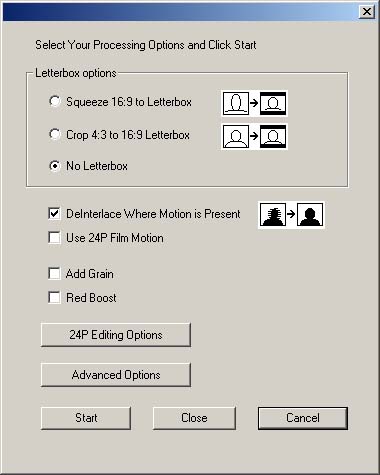
For interlaced video cameras, DVFilm Maker performs the following operations in a single pass:
|
 |
||||||||||||||||||||||||
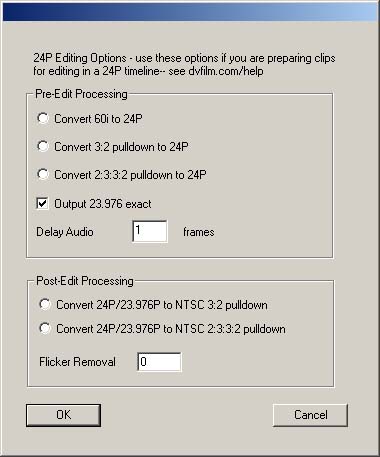 |
For the DVX100, XL-2, HV20*, Maker is also useful for those who edit at 24P:
|
||||||||||||||||||||||||
|
Questions on Macintosh version:
What editing system is it compatible with? Any Quicktime-based editing system like Final Cut Pro or iMovie. What OS do I need? OS X (10.4 or later) and QT 7 or later. OS 10.3 and earlier versions no longer supported. If the output is 24P or 25P progressive-scan, will it play back on regular NTSC or PAL televisions? Yes. Is there a Windows version? How does it work? Is the de-interlacing method better than I can do with Final Cut Pro or After Effects? Yes, much better. Nearly all plug-in and built-in de-interlacers reduce vertical resolution by 50%. But DVFilm Maker works by analyzing motion in each frame, and only changing pixels in areas of the screen in which there is movement. This results in a much sharper image especially for scenes where the camera is still. Maker also detects horizontal lines and prevents aliasing, or "dot crawl". You will notice that the output video from DVFilm Maker is just as sharp and clear as your original footage, yet looks as if it were shot on film. Here is a comparison test. Is it better than Magic Bullet? Maker uses different methods and gets smoother results than MB, since Maker blends fields together instead of skipping fields when converting 60i to 24P. But it's also 10 times faster and 5 times cheaper than Magic Bullet, and runs without Adobe After Effects, itself an expensive and hard-to-learn program. What kinds of video can it convert to 24P?
Can it convert the Sony HDV 60i format to high-quality 24P HD? Yes it can, see here for details. Can I try it first? Yes. The demo version of DVFilm Maker works exactly the same as the release version, except that it burns the DVFilm logo into each output frame. Here is a sample Quicktime (NTSC 16:9) to test it on: click here to download. How do I order DVFilm Maker?
Mac Users: Click here for updates and online help *Note: HD/HDV pulldown remove features and available in Windows version only. Join the discussion group on DVFilm transfers and DVFilm software, click here. |
|||||||||||||||||||||||||